

Order of operations
Operations run in the order they appear on the home page. There are two levels of ordering: across types (fixed) and within a type (you control it).
Type order is fixed
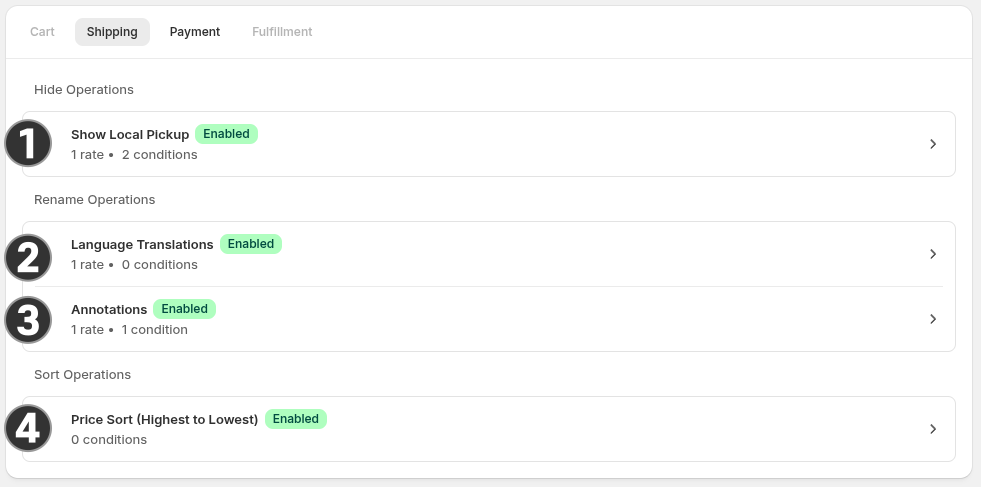
Section titled “Type order is fixed”On the home page, operations are grouped by type. The types always appear in the same order. For example, Shipping Operations always execute in the following order:
- Hide
- Rename
- Sort
You can’t change this order. Every hide operation runs before every rename, and every rename runs before every sort.
This matters because later types see the effects of earlier ones. A sort operation that sorts by rate title is sorting the renamed title, not the original. If you rename “Standard Shipping” to “Free Shipping” and then sort alphabetically, the sort sees “Free Shipping.”
Within a type, you control the order
Section titled “Within a type, you control the order”Within each type on a given surface, operations run top to bottom. Drag and drop to reorder. This is particularly useful when sorting as the last operation to execute will be the primary sort. For example: Sorting by rate name and then price will primarily sorted by price, and secondarily sorted by name. It’s also useful for Hide operations as one operation can hide and a latter can “show” the rate, nullifying the original hide. This is more nuance than functionality, but an important one.
Putting it together
Section titled “Putting it together”At checkout, the function evaluates operations in this sequence:
- All hide operations on the surface, top to bottom.
- All rename operations on the surface, top to bottom.
- All sort operations on the surface, top to bottom.
Each operation sees the cumulative result of everything before it. A rename sees rates after hides have removed some. A sort sees rates after hides and renames have run.
See also
Section titled “See also”- The home page — drag and drop to reorder within a type.
- Operations overview — the shared shape of every operation.
- Conditions — how conditions combine within a single operation.